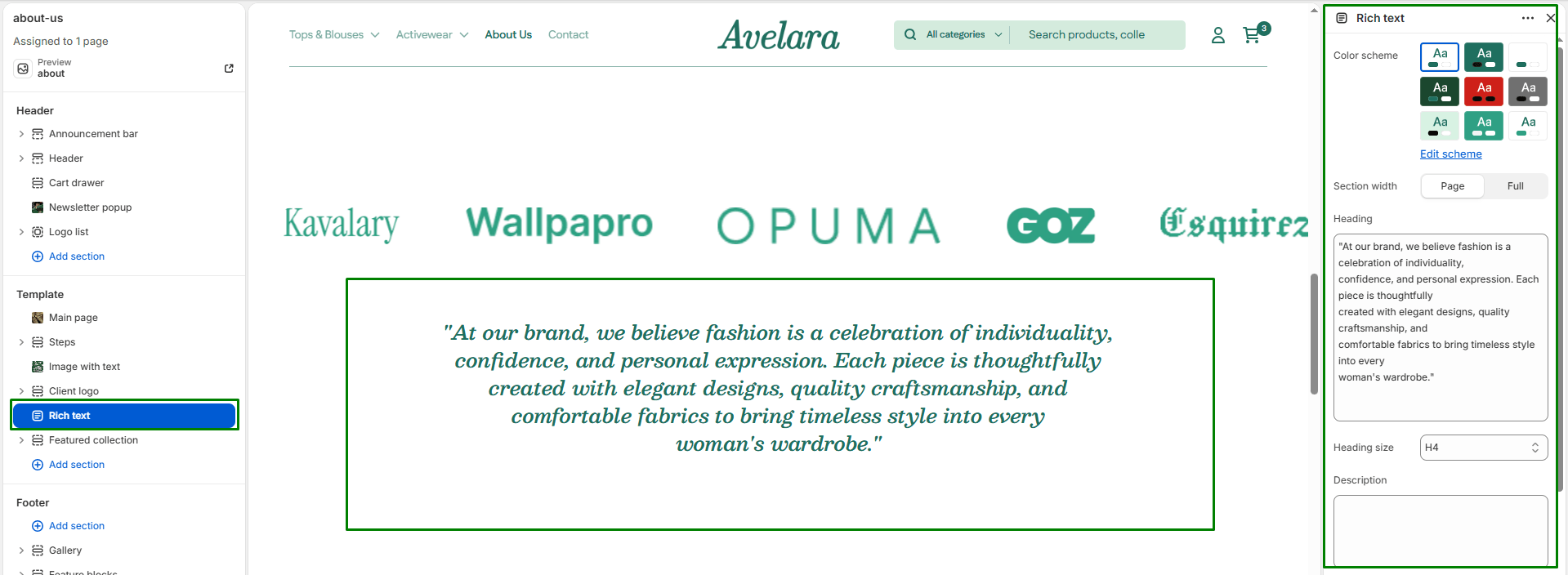
The Rich text section is a clean, versatile component used to introduce collections, tell your brand story, or highlight key value propositions. It features a centralized, typography-focused layout (heading, description, and button) without any distracting imagery.
Section settings
-
- Color scheme: Select a predefined color palette (background/text colors) from your theme settings to create high-contrast text blocks.
- Section width: Choose whether the section is constrained to
Pagewidth or stretches toFullwidth across the browser. - Text content:
- Heading & Size: Enter the main text for the section. This field supports multi-line text (using the Enter key) to create a bold statement. Choose from H1 (largest) to H6 (smallest) to manage visual hierarchy.
- Description & Text size: Add a secondary paragraph of text below the heading, and control its font size.
- Text Align: Set the alignment of all the text and the button (
Left,Center, orRight).
- Button:
- Button label: Enter text (e.g., “Shop Now”) to display a call-to-action button.
- Button link: Paste a URL or select a destination from your store.
- Button style: Select the visual style of the button (
PrimaryorSecondary).
- Top padding / Bottom padding: Adjust the vertical spacing (in pixels) above and below the section to give the typography room to breathe.