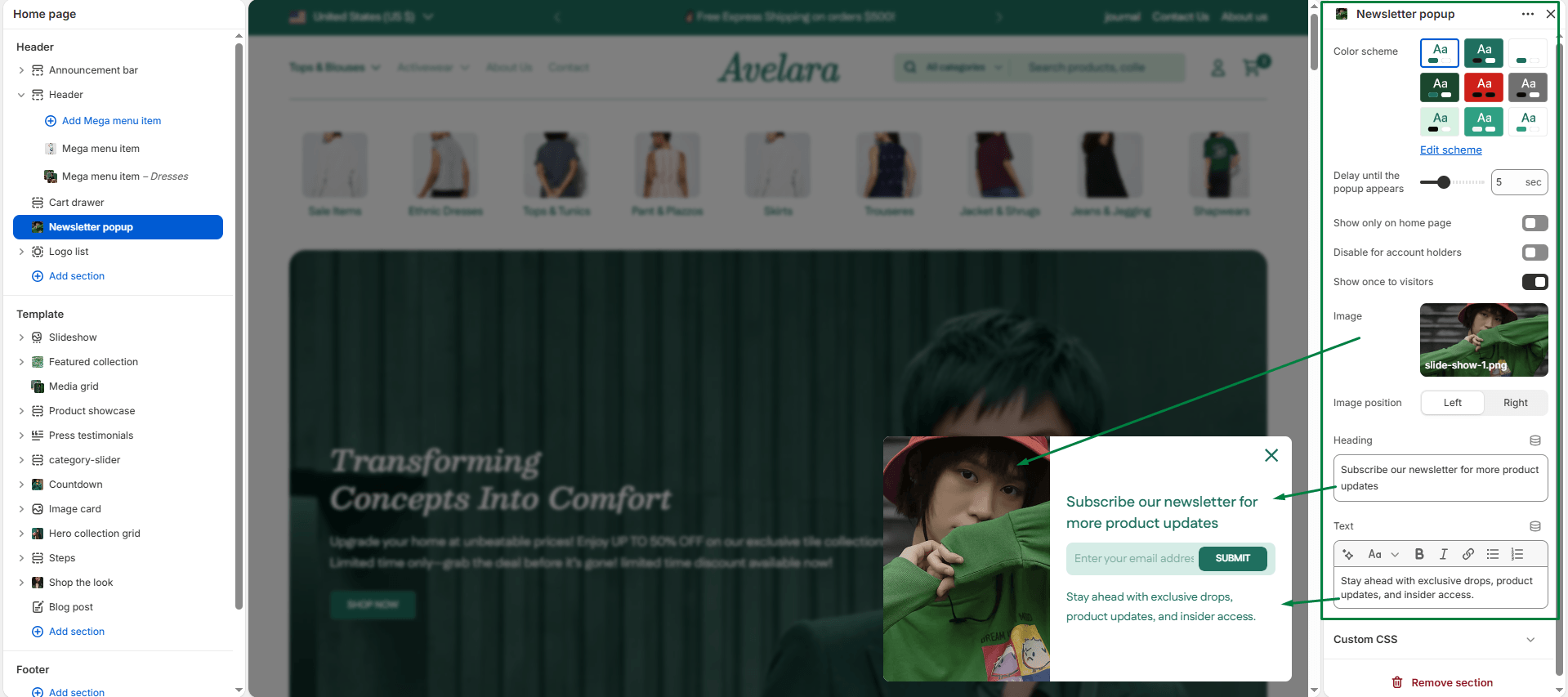
The Newsletter Popup section allows you to capture customer emails and aggressively grow your subscriber list with a stylish, highly customizable pop-up modal. It is perfect for displaying promotional messages (such as a 10% discount for first-time buyers) and can be configured to appear automatically after a visitor lands on your store.
Navigate to Sections > Newsletter popup to customize the following settings:
-
- Color scheme: Select the color scheme to match your theme’s primary design. The pop-up will adapt its text and background colors automatically.
- Delay until the pop-up appears: Use the slider to set the delay (in seconds) before the pop-up appears when the page loads. A default of 5 seconds gives the customer a moment to look at your store before being prompted.
- Show only on the home page: Enable this setting if you want the pop-up to trigger only when a customer lands directly on your homepage, keeping product pages distraction-free.
- Disable for account holders: If enabled, logged-in customers will not see the pop-up. This is highly recommended to avoid annoying returning customers who have likely already subscribed.
- Show it once to visitors: Prevents the pop-up from appearing repeatedly for the same visitor by saving a cookie in their browser.
- Image & Image position: Upload an eye-catching image to display alongside the text (ideal for lifestyle imagery or brand visuals). You can choose whether this image is anchored to the Left or Right side of the pop-up.
- Heading: Add a strong, actionable main heading (e.g., “Get 10% Off Your First Order”).
- Text: Add supporting text below the heading to explain the benefits of subscribing (e.g., “Sign up to receive exclusive promotions, new product alerts, and sales directly to your inbox.”). Basic text formatting is supported.