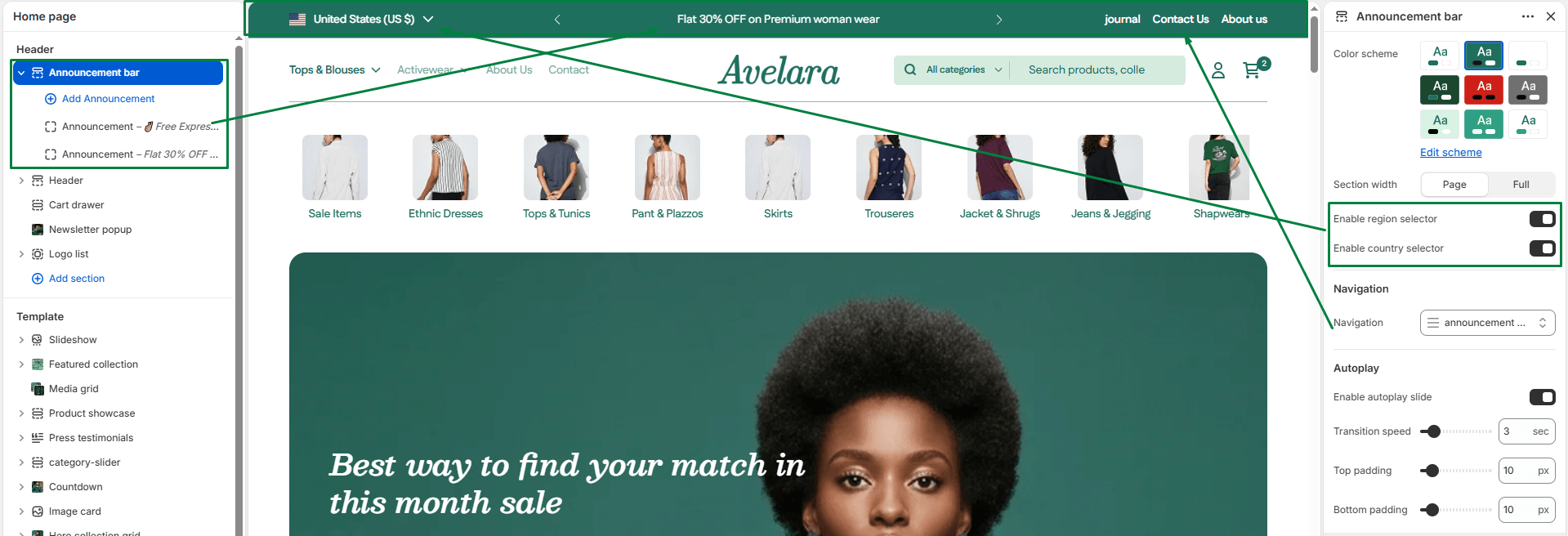
The Announcement bar is a banner located at the very top of your store. It is perfect for displaying rotating messages like free shipping thresholds, flash sale promos, or important company updates.
Navigate to Sections > Announcement bar in the Theme Editor to customize the following settings:
-
- Color System: Choose a color scheme that contrasts well and grabs the customer’s attention.
- Section Width: Choose between
page-width(constrained to the main content area) orfull-width(stretches edge-to-edge). - Language & Country Selectors: Toggle these checkboxes to display Shopify’s native localization selectors on the left side of the announcement bar. This allows international customers to choose their preferred language or currency.
- Menu: Select a navigation menu to display on the right side of the announcement bar (great for secondary links like “Contact Us” or “FAQ”).
- Autoplay & Duration: Enable the “Autoplay” checkbox to automatically rotate through your announcements if you have more than one. You can use the “Autoplay duration” slider to set how many seconds each message stays on screen before sliding to the next.
- Top & Bottom Padding: Use these sliders to adjust the vertical spacing (in pixels) above and below the announcement bar.
Blocks
Adding Announcement Messages : Inside the Announcement Bar section, you can add multiple Announcement blocks. For each block, enter your text message and optionally add a link (e.g., linking the text “Free shipping over $100” directly to your shipping policy).