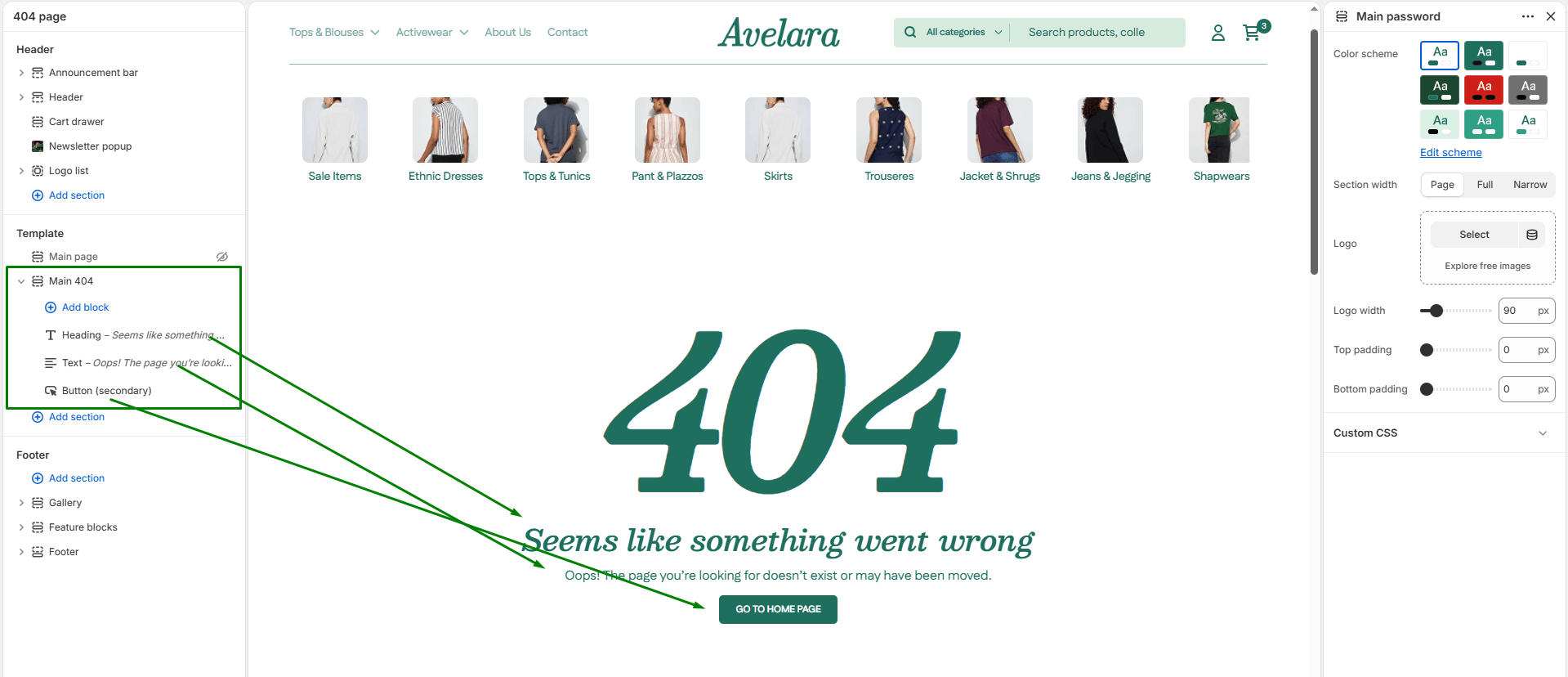
The Main 404 section controls the design of your “404 Error” (Page Not Found) template. This is the page customers see if they click a broken link or type an incorrect URL. A well-designed 404 page reduces frustration and smoothly guides users back to your homepage or popular products.
Navigate to Sections > Main 404 (you can view this by selecting “404 page” from the template dropdown at the top of your Theme Editor) to customize these settings:
-
- Color scheme: Applies your chosen theme color scheme to the 404 page background and text.
- Section width: Choose how wide the content spans:
page-width(uses the default container width) orfull-width(stretches the section edge-to-edge). - Image: Upload or select a custom graphic, illustration, or brand icon for the 404 page. If left empty, the section will gracefully fallback to a default text heading.
- Top & Bottom padding: Adjust the vertical spacing (in pixels) above and below the section to perfectly balance your layout.
Blocks
this section supports Shopify’s standard Theme Blocks, you can enrich your 404 page with multiple content blocks to create a highly custom layout. Simply click Add block to insert:
-
- Heading: A strong title (e.g., “Oops! Page not found”).
- Subheading & Text: Explanatory text apologizing for the error and guiding the user.
- Button: A crucial call-to-action (e.g., “Back to Homepage” or “Continue Shopping”).
- Image: Additional supporting graphics.