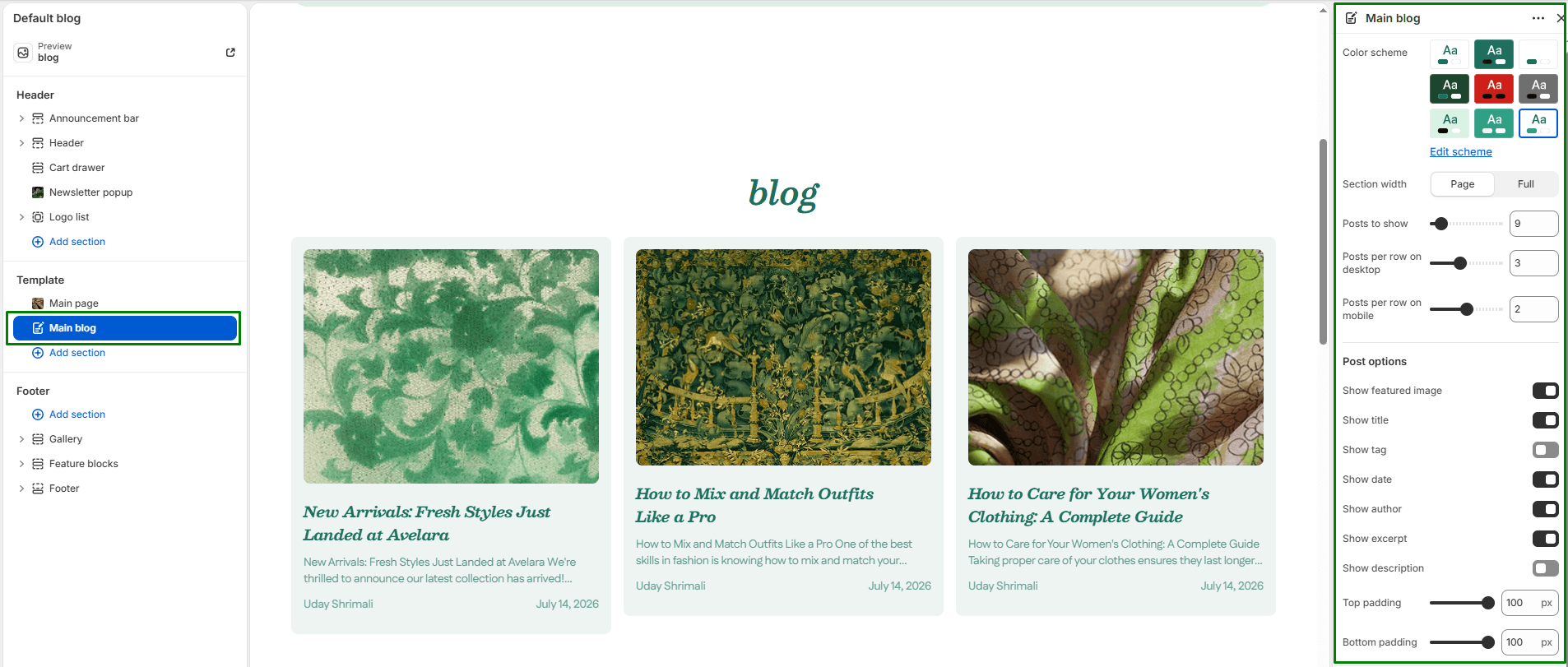
The Main Blog section displays your store’s blog index (the main page listing all your posts) in a beautifully customizable grid layout. It allows you to toggle exactly what metadata is shown on the cards (like author names and publication dates). The layout is fully responsive and supports automatic pagination.
Navigate to Sections > Main blog (you can view this by selecting “Blog” from the template dropdown at the top of your Theme Editor) to customize these settings:
-
- Color scheme: Selects the background and text color combination for the entire blog section.
- Section width: Determines how wide the blog section appears:
page-width(constrained to the standard layout) orfull-width(spans edge-to-edge). - Posts to show: Controls the total number of blog posts shown per page before pagination kicks in.
- Desktop posts per row: Use the slider to set how many posts appear in a single row on desktop devices (1 to 6).
- Mobile posts per row: Use the slider to set how many posts are displayed per row on mobile devices (1 to 3).
Post Options These settings control what elements are visible on the individual blog post cards:
-
- Show featured image: Toggles whether to display the blog post’s featured thumbnail image.
- Show title: Enables or hides the blog post title.
- Show tag: Displays the first tag associated with each post (great for visual categorization).
- Show date: Shows the publication date of each blog post.
- Show author: Displays the name of the blog post’s author.
- Show excerpt: Shows the short excerpt summary of the blog post content.
- Show description: Displays the full blog post description as a fallback if you prefer showing more text.
- Top & Bottom padding: Adjust the vertical spacing (in pixels) above and below the section.