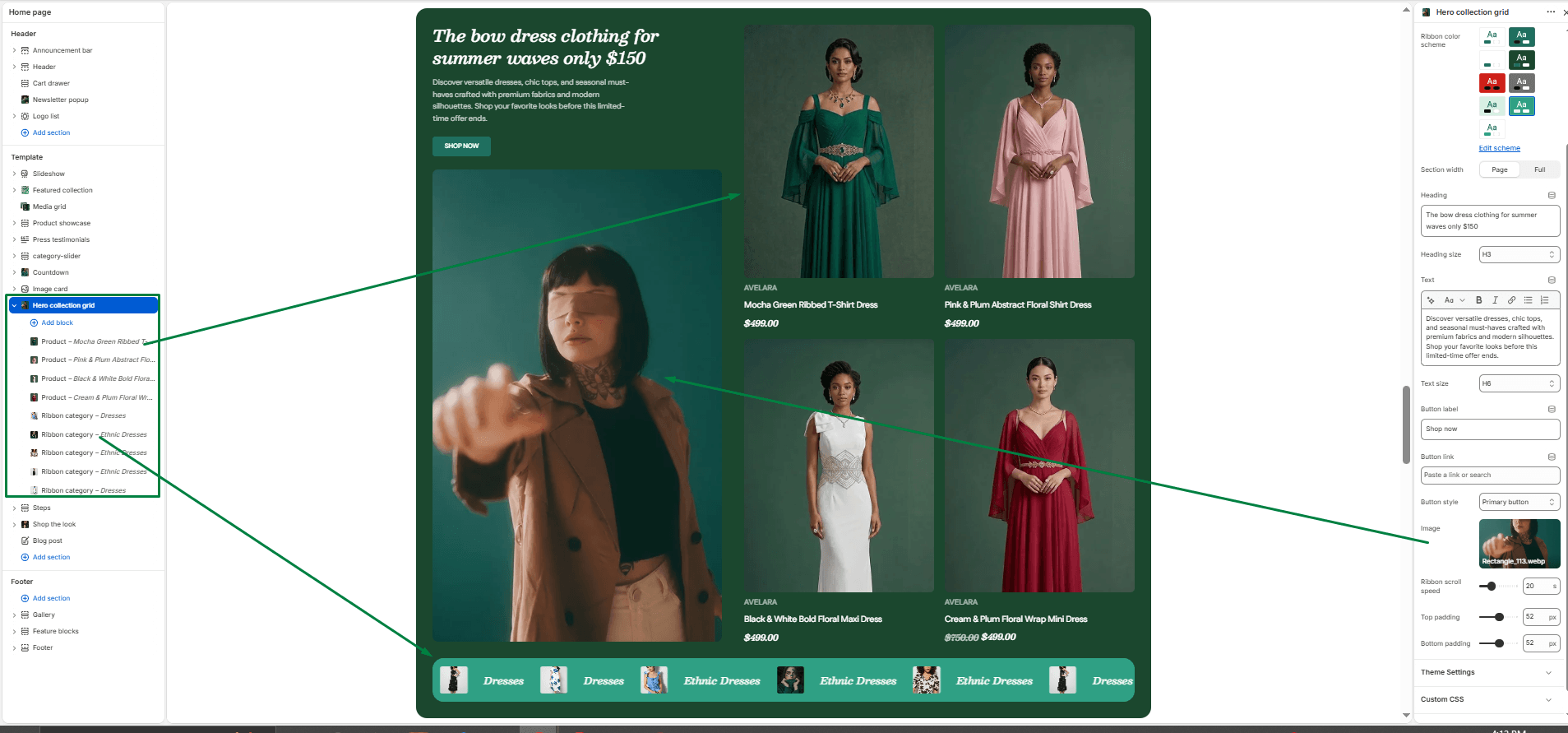
he Hero collection grid is a powerful, multi-part section ideal for your homepage. It features a split layout: on one side, you have your main promotional text and a large lifestyle image; on the other side, a neat grid of featured products. Additionally, this section includes a continuous scrolling “marquee” ribbon at the bottom where you can link to various categories or collections.
Section settings
-
- Color scheme: Controls the main background and text colors for the upper hero section (text, image, and product grid).
- Ribbon color scheme: Controls the background and text colors specifically for the scrolling marquee ribbon at the bottom.
- Section width: Choose whether the section is constrained to
Pagewidth or stretches toFullwidth. - Hero Content (Left Side):
- Heading & Size: Add your main promotional title (e.g., “The bow dress clothing for summer”) and set its size.
- Description & Text size: Add supporting paragraph text and adjust its size.
- Button label & Link: Add a call-to-action button (e.g., “Shop Women’s Wear”) and its destination URL.
- Button style: Choose between the primary or secondary button style.
- Image: Upload the large lifestyle image that sits below your hero text.
- Ribbon scroll speed: Adjust the speed of the continuous scrolling animation for the bottom ribbon (from 5 to 60 seconds).
- Top padding / Bottom padding: Adjust vertical spacing (in pixels) above and below the entire section.
Blocks
You can mix and match up to 20 blocks in this section. There are two types of blocks you can add:
-
- Product Block:
- Product: Select a product to display. These products will populate the grid on the right side of the hero section. They display the product’s featured image, vendor, title, and price.
- Ribbon Category Block:
- Text: The name of the category (e.g., “Dresses” or “New Arrivals”).
- Link: The URL the category should link to.
- Image: A small icon or image representing the category.
- Note: These category blocks populate the scrolling marquee ribbon at the very bottom of the section.
- Product Block: