The Main Password section controls the layout and design of your Shopify password page, also known as the “coming soon” or “store under construction” page. This page is displayed when your Shopify store is password-protected, allowing you to share a sneak peek, build hype, or collect emails before you officially launch.
This section is designed for clean simplicity, featuring your brand’s logo, a custom message, and a newsletter signup form—all perfectly balanced visually.
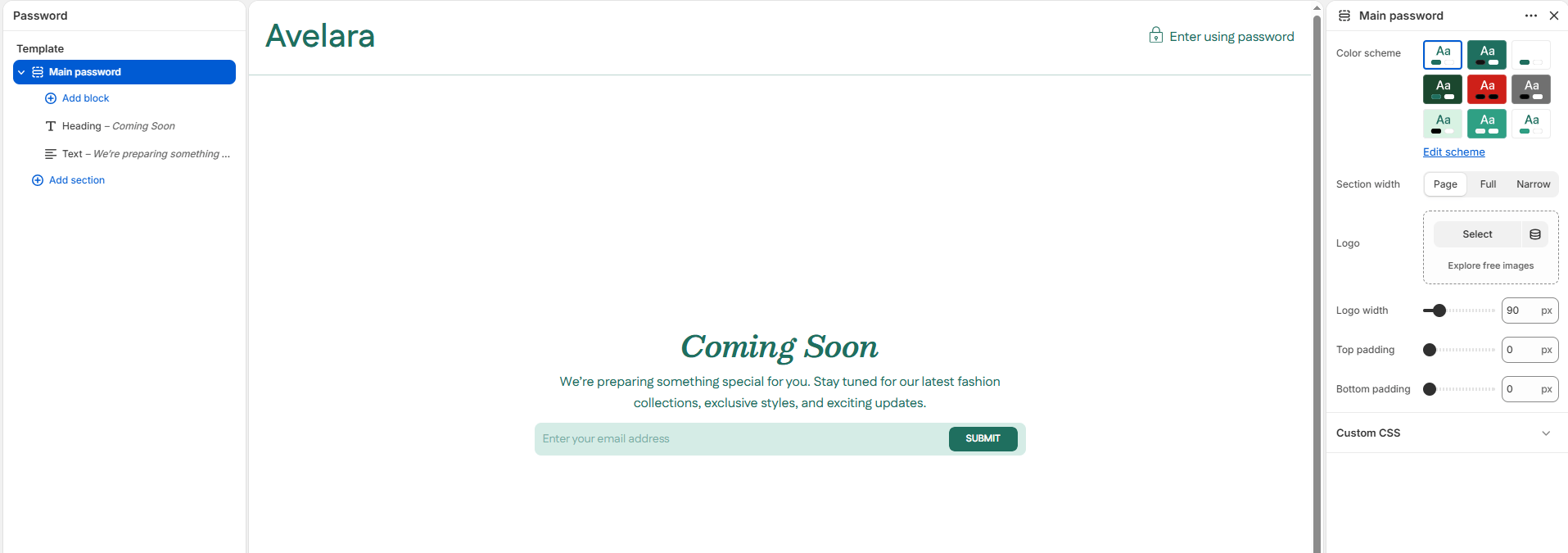
Navigate to Sections > Main password to customize these settings:
-
- Color scheme: Applies your chosen theme color scheme to the password page’s background, text, and buttons.
- Section width: Choose how wide the section spans on the page:
page-width(constrained to standard content width),full-width(spans the entire screen), ornarrow-width(creates a smaller, highly minimal centered layout). - Logo: Upload your brand logo to be displayed prominently at the top of the password page.
- Logo width: Use the slider to adjust the displayed width of your logo (in pixels) for the perfect proportion.
- Top & Bottom padding: Adjust the vertical spacing (in pixels) above and below the password page content.
NOTE
The text message that actually displays on this page (e.g., “Coming soon!”) is controlled in your Shopify Admin under Online Store > Preferences > Password protection.


