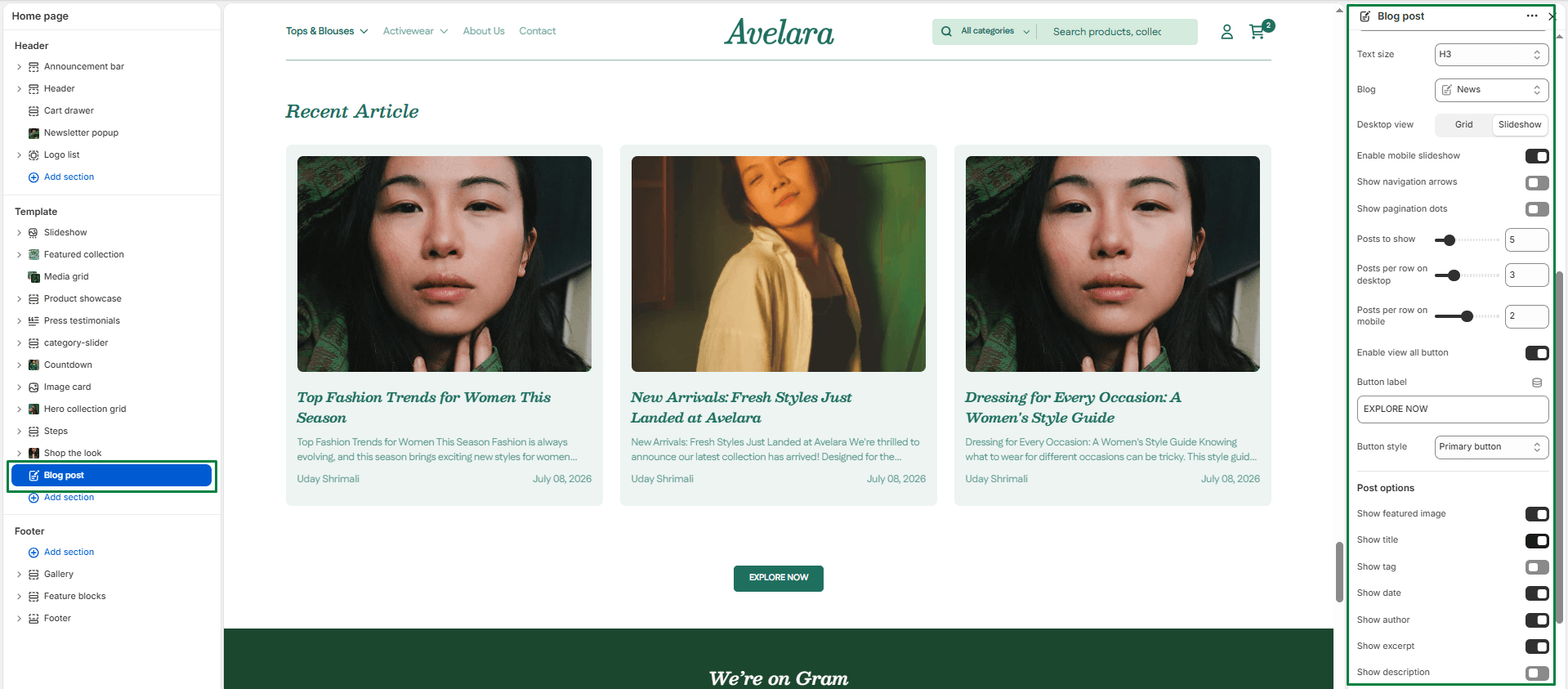
The Blog Post section allows you to feature recent articles from your Shopify blog anywhere on your store (such as your homepage). It’s ideal for highlighting educational content, product tips, lifestyle insights, or brand news—helping you engage customers and improve SEO visibility.
Navigate to Sections > Blog post to customize these settings:
-
- Color scheme: Select a predefined color palette to ensure the blog section blends seamlessly with your store’s theme.
- Section width: Choose between
page-width(constrained) orfull-width(edge-to-edge) to control the horizontal span of the section. - Heading & Size: Add a main title for the section (e.g., “From the Journal”) and choose its size (H1-H6).
- Description & Text Size: Add an optional descriptive text below the heading (great for SEO context) and control its size.
- Blog: Select exactly which blog from your Shopify admin to display articles from.
- Desktop layout: Select between a standard
gridor an interactiveslideshowlayout for desktop viewing. - Enable mobile slider: Turns the grid into a swipeable slider on mobile devices (highly recommended to save vertical space).
- Slider Controls: If using a slideshow layout, you can toggle Show navigation (arrows) and Show pagination (dots).
- Posts to show: Set the total maximum number of posts to display.
- Posts per Row (Desktop/Mobile): Adjust the number of post cards displayed per row on desktop (2 to 6) and mobile (1 to 3).
- View All Button: Toggle Show view all to display a button linking to your full blog page. You can customize the button’s Label (e.g., “See All”) and choose its Style class (Primary or Secondary).
Post Options
These settings control what details are visible on each individual blog post card:
-
- Show featured image: Display the main image from each post.
- Show title, tag, date, & author: Toggle the visibility of the post title, category tag, publication date, and author name.
- Show excerpt/description: Choose whether to show a short summary (excerpt) or a longer text description below the title.
- Top & Bottom padding: Adjust vertical spacing (in pixels) above and below the entire section.