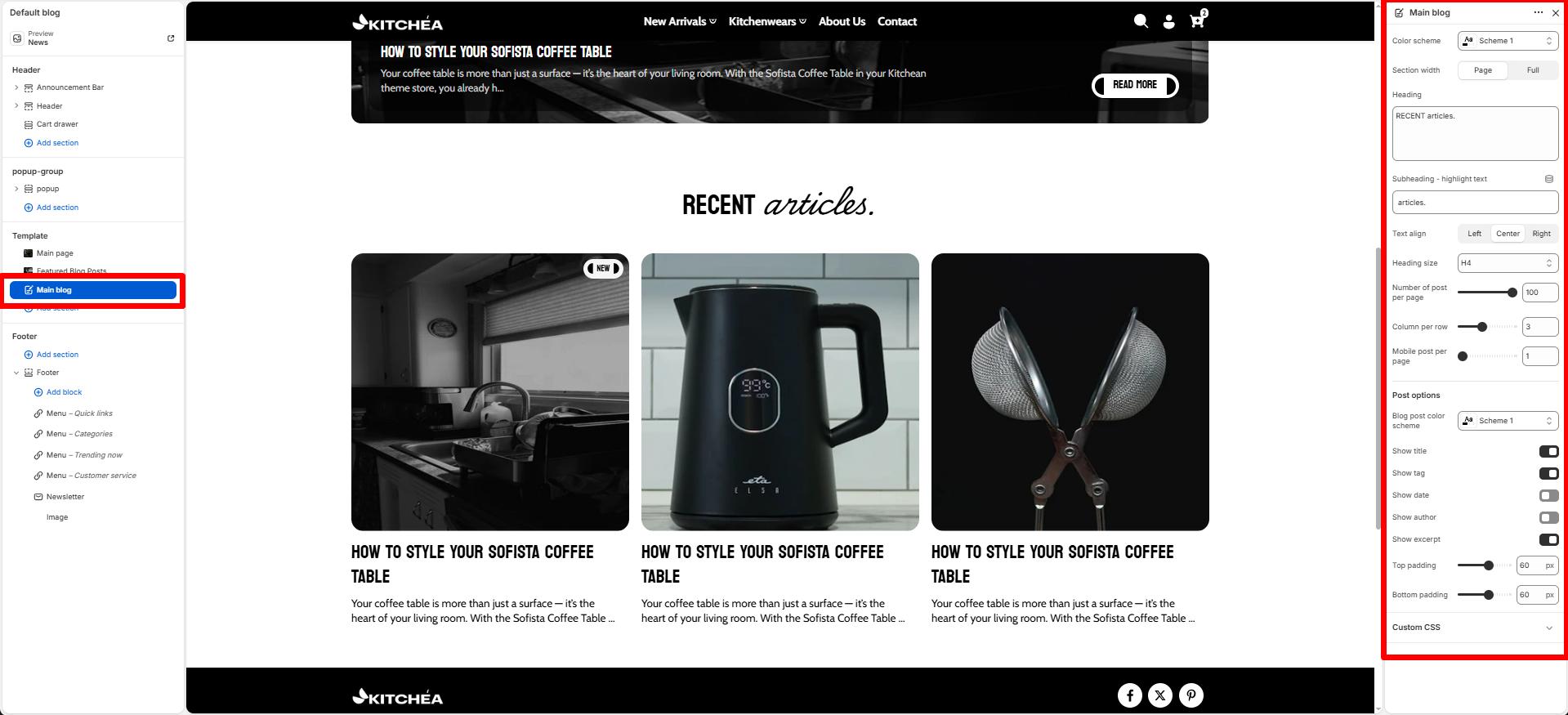
Main Blog
This page lists the blogs published on your website. The page will show your blogs based on the published date.
Color scheme
Select color system for background, text and button color.
Section width
Choose how wide the section spans on the page:
-
- Page – aligns with the site’s content width.
- Full – stretches across the full viewport width.
Heading
The section’s main title.
Subheading – Highlight Word
This word will be visually highlighted using the Subheading font style, adding a decorative touch to your blog section title.
Text Align
Aligns the content.
-
- Left
- Right
- Center
Heading Size
Adjusts the size of the heading in dropdown (H1 to H6).
Number of post per page
The maximum number of blog limit.
Column per row
Adjust the Desktop Column to specify the number of blog to display within each row inside the section. The minimum number is 2 blog and the maximum is 6. This setting applies to desktop display devices.
Mobile post per page
Use the Mobile post per page radio buttons to specify the number of blogs to display in each row inside the section. The options are 1 and 2. This setting applies to mobile display devices.
Blog card color
Apply a color scheme for individual post cards.
Show title
Select the checkbox to show/hide a title from the article.
Show excerpt
Select the checkbox to show/hide a few lines of description (excerpts) from the article.
Show tag
Select this checkbox to show/hide tags applied to articles.
Show date
Select this checkbox to show/hide the date the article was published.
Show author
Select this checkbox to show/hide details about the article’s author.
Top Padding / Bottom Padding
Sets spacing above and below the section to control vertical layout.