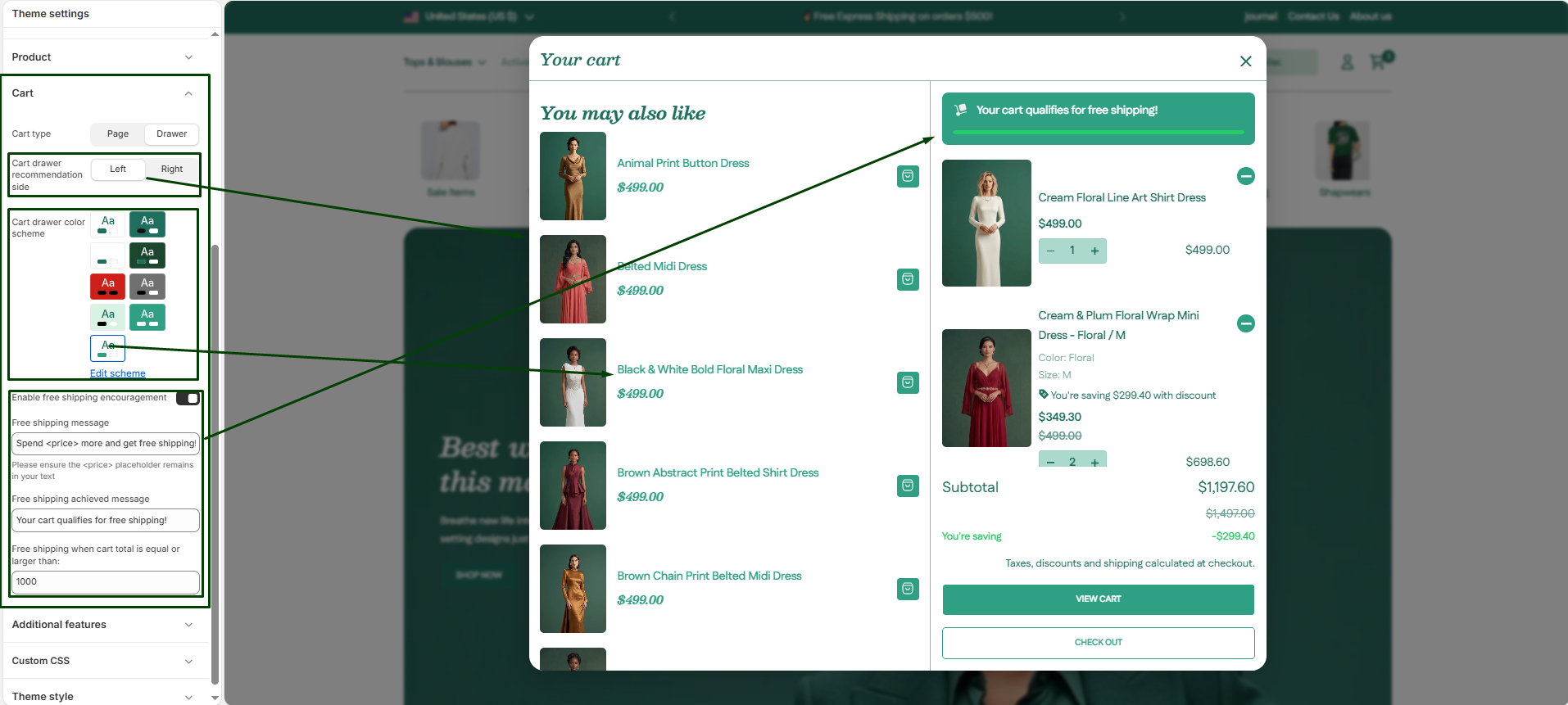
The cart experience is a critical part of the customer journey. You can customize how customers view their selected items and use incentives to encourage higher order values.
Navigate to Theme settings > Cart to configure these options:
-
- Cart type: Choose how the cart behaves when a customer adds a product.
- Drawer: The cart slides in from the side of the screen, allowing customers to view their items without leaving their current page. This creates a smooth, modern shopping experience.
- Page: This traditional approach redirects the customer immediately to a dedicated cart page after they click “Add to cart.”
- Cart side: If you are using the Drawer cart type, you can choose whether the drawer slides in from the Left or the Right side of the screen.
- Cart drawer color system: If you are using the Drawer cart type, you can independently select a color scheme (background and font colors) to make it visually distinct from the rest of your page.
- Enable free shipping: Select the Show free shipping progress checkbox to display a dynamic progress bar in the cart. This is a proven way to increase Average Order Value (AOV) by gamifying the shopping experience.
- Minimum shipping price: Enter the monetary value that triggers free shipping (e.g.,
150). The progress bar will automatically calculate how close the customer is to reaching this goal based on their current cart total. - Free shipping message: Customize the text shown to customers before they reach the threshold to encourage them to keep shopping.
- Free shipping achieved message: Customize the celebratory message shown once they hit the goal (e.g., “Your cart qualifies for free shipping!”).
- Cart type: Choose how the cart behaves when a customer adds a product.